 Are you using twitter search at all? Fortunately, using Twitter search is extremely simple if one knows how to. What people usually do is key is what we want to search and click search. Most of you will find that those kind of search are cluttered with so many tweets but what if there is another way to search twitter quickly but more effectively as well?
Today I am going to show you how to use twitter search efficiently
First you need to get a mozilla firefox twitter plugin
It is not a MUST, but it will help you to search twitter quickly.
 If you are using mozilla firefox twitter plugin then you will now have a twitter search on the right hand top of your mozilla browser
Here are some key phrases that will help you to search twitter quickly.
I will be using some examples to give you a rough idea. You can adjust them according to what you want to search.
If you key in….
1. game over
You will search words game and over in a tweet
Eg: I missed the game and now its over
2. “game over”
If you have the two ” ” there, then it will search the exact phrase “game over” in a tweet.
Eg: Game Over. Retry? Oh how I wish.
3. game -over
Searches tweets with game without the words “over” in it.
Eg: I just lost a betting game
4. starbucks OR mcdonald
Search two keywords in one search. So will get two keywords results in one search
Eg for starbucks : starbucks sounds good right about now buy me one
Eg for mcdonalds : So craving for a mcdonald big mac now!
5.from:starbucks
Searches tweets sent by starbucks

6. to:starbucks
Searches tweets sent to starbucks

7. @starbucks
Search for tweets referencing to the username.

8. coffee near:location
Search for tweets on a keyword in a location
eg: coffee near: NY

9. coffee near:location filter:links
Searches for keywords or terms in a location with links in it.
eg: coffee near:NY filter:links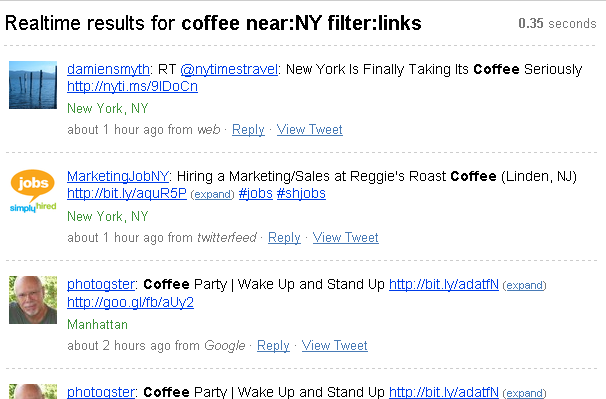
10. near:Boston within:15mi
Searches tweets from people from Boston
Now we know how to search for a keywords mentioning near a location as well as keywords from a location within a certain mile. You can combine them into one.
11. coffee near:boston within:15mi
or even
12. coffee near:boston within: 15mi filter:links
Now you will search all the tweets that has links in them from Boston within 15 miles radius.
After getting the searches that you want, now you can have the feeds sent to you by clicking the feed for this query and be updated with everything that is happening around your location for a keywords or key terms.

 If you like my tips you can subscribe to my RSS feeds to get latest updates or you can subscribe via email and have new post updates sent to your inbox

Great tips! Thanks Aaron!
You're welcome Gabriel,
glad you like the post =)
Uber super! Twitter search is a lot more powerful than I gave it credit for!
Most of the things I knew but the location search was new to me. Cool, thanks Aaron!
Thanks, Aaron! I'm going to post a link to this on my Fan Page: Facebook.com/PromoteUGuru
Clients and colleagues ask me about Twitter “search” a lot, and more often I'm actually telling them that it even exists. Not many people know it's even available.
Lisa
Thanks Aaron,
Being relatively new to Twitter, I knew there was a search function but was not too sharp on how to use it! Very cool to be able to do a location search! I basically have used it to find user names. Thanks for the useful tips. I subscribed to your e-mail updates and think your Twitter feed is awesome!
Tor
Fantastic, Bridie! I consider myself pretty clued-in when it comes to Twitter but even I found some useful tips… you’re clearly investigating all Twitter’s cleverness beyond the basic and putting it to excellent use!
http://www.a3medya.com
useless article